
Winadda Registration
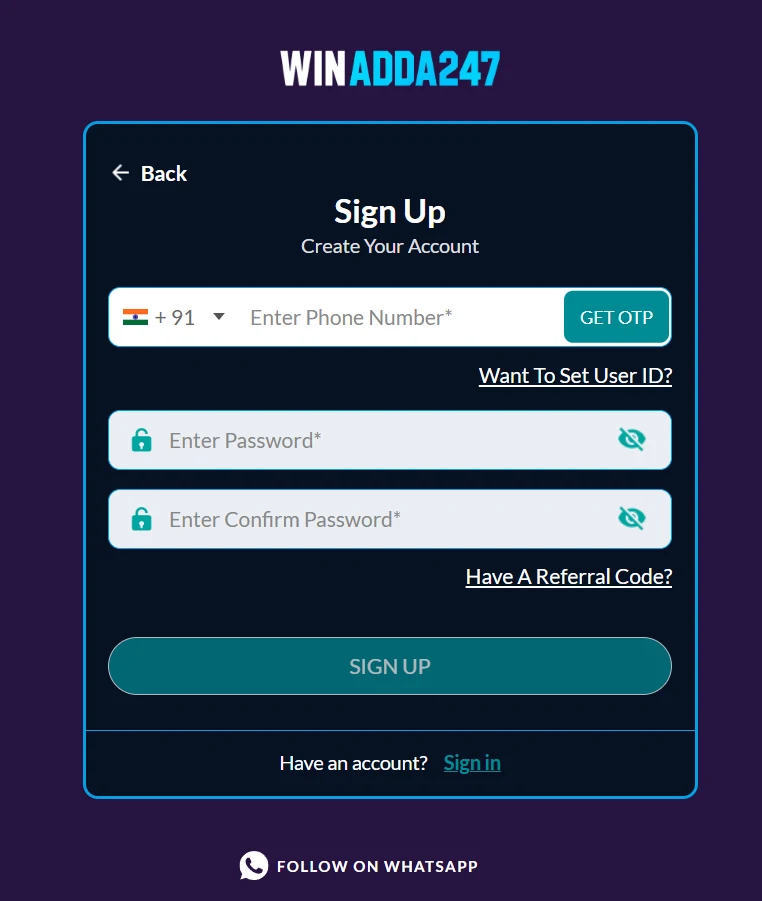
To register on Winadda, open the official website, tap Sign Up / Register, enter your basic details, verify your mobile number with an OTP, and create a strong password.
The Winadda registration process is designed to let new users create an account using their basic personal and contact information. Before submitting your registration, make sure you are using the correct official website or app, as several similarly named sites exist.
Create Your Win Adda ID
Register with your name, mobile number and a new password, then verify with OTP.
Check the address: use only the official Winadda website or app. Several similarly named sites exist, so confirm the domain is wiinadda.com before you enter any details.
Already have a Win Adda ID? Login now
This site is protected by reCAPTCHA and the Google Privacy Policy and Terms of Service apply.
18+ only. Play responsibly. Gaming involves financial risk and is not a source of income.
Winadda Registration Steps
- Open the official Winadda website or app be careful to use the correct official domain, as several similarly named sites exist.
- Select Sign Up, Register, or Create Account.
- Enter the requested details, typically your name, mobile number, and a new password.
- Enter the OTP sent to your registered mobile number to verify your identity.
- Submit the form and log in using your mobile number/username and password.
Before You Register on Winadda
Before creating your account, consider the following:
- Use a unique password that you do not use on any other platform.
- Never share the registration OTP with anyone, including someone claiming to be Winadda support.
- Check the platform’s terms, age and location requirements, bonus conditions, and withdrawal rules before adding money.
- Avoid links sent through unknown WhatsApp, Telegram, or SMS messages; go directly to the official site instead.
- If you do not receive the OTP, check mobile signal, confirm the number is correct, wait briefly, and request it again.

How Can I Reset a Strong Password on Winadda?
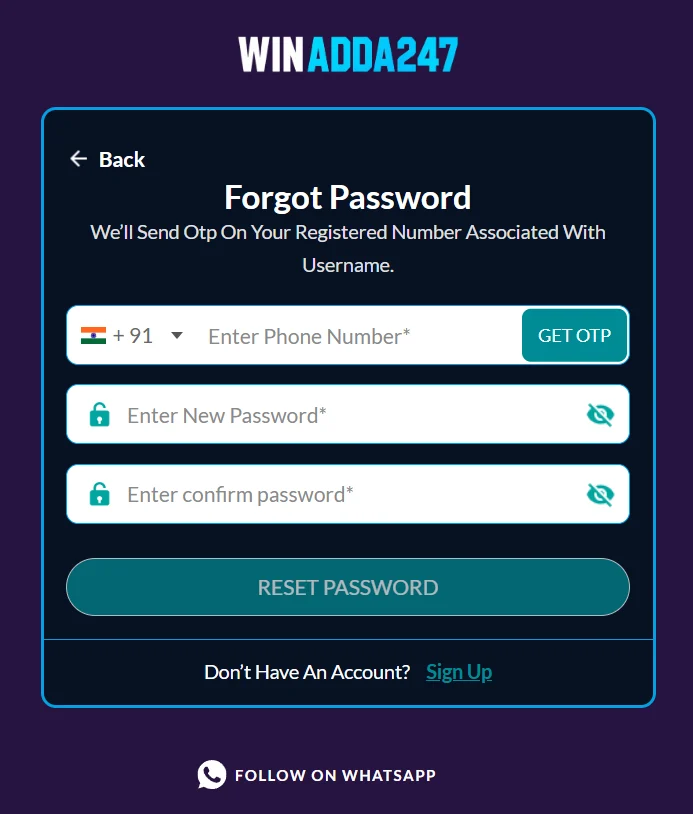
To set a strong new password on Winadda, use the official Forgot Username/Password? page, verify your registered mobile number with the OTP, then create a unique password.
Winadda Password Reset Steps
- Open the official Winadda login page, such as wiinadda.com/login.
- Select Forgot Username/Password?
- Enter the mobile number linked to your account.
- Enter the OTP sent to that number never share it with anyone.
- Create and confirm a new strong password, then log in with it.
How to Make Your Winadda Password Strong
- Use at least 12–16 characters.
- Combine uppercase letters, lowercase letters, numbers, and symbols.
- Avoid your name, phone number, birthday, or simple patterns such as 123456 or password.
- Do not reuse a password from another website or app.
- Consider a passphrase such as Blue-Mango-Rocket-42! long, memorable, and hard to guess.
Winadda Password Security Reminders
Complete recovery only through the official Winadda page; do not give your password, OTP, or account details to anyone claiming to offer special recovery help.
If the OTP does not arrive, check your network signal, confirm the registered number, and request it again.
How Can I Connect on WhatsApp to the Winadda Team for a New ID and Help?
You can contact Winadda through the WhatsApp link published on its official policy pages: https://wa.link/winra.
The site says WhatsApp is for initial contact or quick reporting and is text-only no calls.
How to Request a New Winadda ID
- Open the official Winadda website you are using.
- Go to Contact Us, Support, or the Register page, which includes a phone-number/WhatsApp field.
- Use the official WhatsApp link or the contact option shown there.
- Send a short message such as: “Hi, I need help creating a new Winadda ID. Please guide me through registration.”
- Follow only instructions received through the official channel, and complete registration yourself on the official website/app.
Winadda WhatsApp Safety Precautions
- Do not send your password, OTP, bank card details, UPI PIN, Aadhaar number, or full ID documents over WhatsApp.
- Verify the WhatsApp contact by opening it from the official Winadda site rather than a message or advertisement.
- Be cautious: multiple websites use the “Winadda” name, and unsolicited “agents” may be scams.
For formal complaints or privacy issues, the listed email is support@wiinadda.com the grievance contact is grievance@wiinadda.com
How Do I Verify the Official Winadda Website?
To verify an official Winadda website, check the exact domain, HTTPS certificate, contact details, domain age, and whether the site links consistently to the same official support channels.
Third-party checks alone cannot guarantee legitimacy, so do not rely only on a padlock icon or online reviews.
Check the Exact URL
Type the address yourself rather than clicking an SMS, WhatsApp, Telegram, or ad link. Look for misspellings, extra words, hyphens, or unusual endings such as .xyz, .top, or .buzz.
Check HTTPS
The address should begin with https://; never enter login details, OTPs, or payment information on a non-HTTPS page.
Check the Domain Age
Use a WHOIS lookup to see when the domain was registered. A very new domain—especially under three months old—is a warning sign.
Check Contact Details
The site should provide clear support/contact information, not only a Telegram handle or random WhatsApp number.
Check Policies and Links
Check that Terms, Privacy Policy, and Contact Us pages open properly and contain consistent company/contact details. Broken or missing policy pages are a red flag.
Check Reputation
Search the exact domain in scam-check services such as ScamAdviser or ScamFoo, but treat their scores as one signal—not proof.
Check Payment Safety
Avoid paying through personal UPI IDs, unknown wallets, or links sent by “agents.” Use only payment methods shown on the verified official site.
Winadda Website Red Flags
- A WhatsApp or Telegram “agent” sends you a login link and asks for your OTP or password.
- The domain is newly registered, has odd spelling, or uses a cheap-looking extension.
- The site promises guaranteed wins, unusually large bonuses, or immediate withdrawals without clear terms.
- Support exists only on Telegram/WhatsApp and refuses official in-site support.
If you are unsure, do not register, deposit, or log in. First verify the domain through WHOIS and a scam-check service, then contact support only through details published on that verified site.
Winadda Registration FAQs
How do I create a Winadda account?
Open the official Winadda website or app, tap Sign Up / Register, enter your name and mobile number, create a password, verify with the OTP sent to your phone, then submit the form.
What details do I need to register on Winadda?
Usually a valid mobile number, your name, and a new password. Some platforms may also ask for email or KYC details later for account recovery or withdrawals.
Why do I need to verify my mobile number?
OTP verification confirms that the mobile number belongs to you and helps protect the account from unauthorized registration or access.
What if I do not receive the Winadda OTP?
Check your network signal, confirm the mobile number is correct, wait a minute, and request the OTP again. Do not share any OTP with anyone.
Can I register with someone else’s mobile number?
No. Use your own number, because OTPs, password resets, and account-recovery messages will be sent to it.
What should my Winadda password be?
Use a unique password of at least 12–16 characters with uppercase and lowercase letters, numbers, and symbols. Avoid your name, phone number, or birthday.
Can I create more than one Winadda account?
Avoid creating duplicate accounts. Multiple accounts can violate platform terms and may lead to restrictions or loss of access.
What should I do after registering on Winadda?
Log in, review your account and recovery settings, enable any available security options, and never share your password or OTP with support agents or other users.