
Winadda APK Latest Version – Official Download Guide
The Winadda APK latest version should be downloaded only from the official Winadda page. This guide shows you where to get the Android file, how to check its details and how to install or update it safely. Before downloading, confirm that your browser shows https://wiinadda.com/ and not a similar-looking address. Never install a Winadda APK received through an unknown message, group or file-sharing link.
Quick answer
- Download the APK through the official Winadda app page.
- Check the version, file size and Android requirement before installing.
- Keep Google Play Protect enabled and review any warning it displays.
- Remove the browser’s “install unknown apps” permission after installation.
- Never share your password, OTP, UPI PIN or CVV with anyone.
Table of Contents
Winadda APK quick facts
| Detail | Official file information |
|---|---|
| Current version | 6.1.3 |
| APK file size | 18.1 MB |
| Android required | 4.1.1 |
| Last file update | Oct 2, 2026 |
| Official download page | Download Winadda APK |
Download the latest Winadda APK
Use the official app page rather than a search-result download button or a third-party mirror. A copied page may use the Winadda name while serving a different, modified or outdated file.
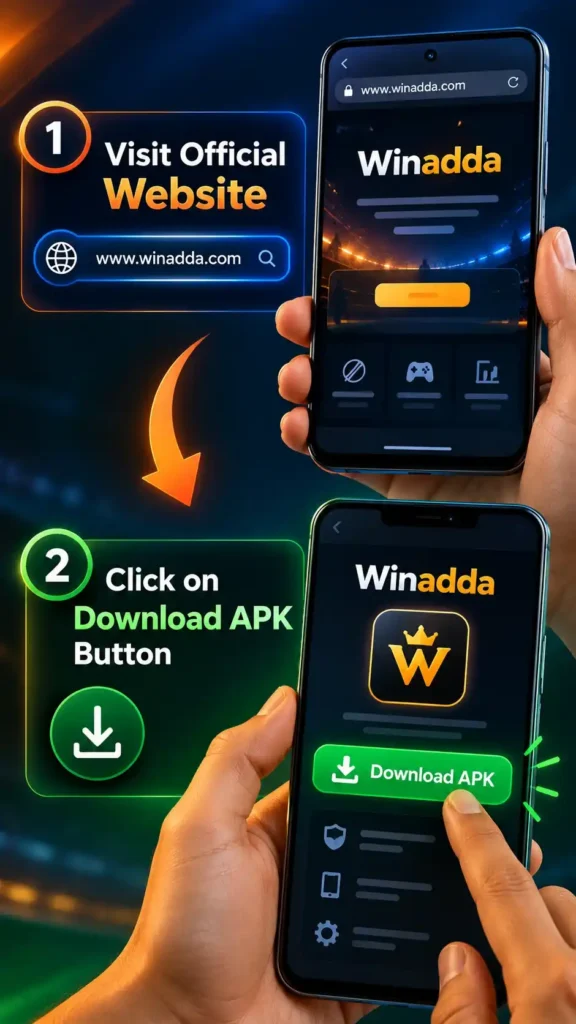
- Open Chrome or another trusted browser on your Android phone.
- Type
https://wiinadda.com/in the address bar and check the spelling. - Open the Winadda app download page.
- Compare the displayed version and file size with the quick facts above.
- Tap Download Winadda APK and wait for the file to finish downloading.
- If the browser shows a download warning, verify the domain and file details before continuing.
Download Winadda APK: Get the latest version from the official app page
Install Winadda APK safely
Android blocks website-downloaded apps until the user approves the source. On Android 8.0 and later, this permission is granted to the specific browser or file manager used for installation; menu names may differ by phone brand.developer.android+1
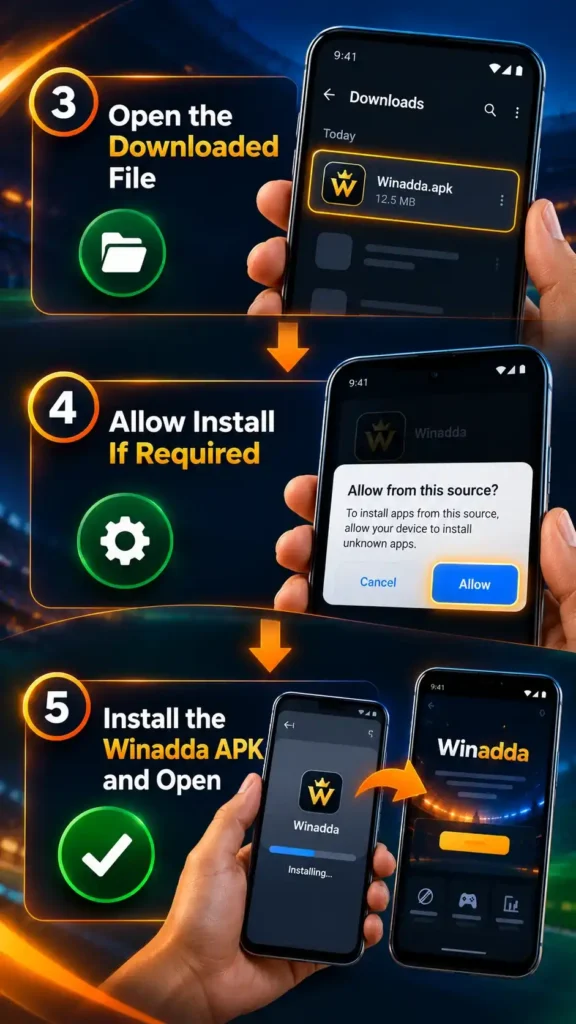
- Open the completed APK download from your browser or Downloads folder.
- If Android blocks the file, tap Settings on the warning screen.
- Turn on Allow from this source only for the browser or file manager you used.
- Return to the installer, check the app name and tap Install.
- Wait for confirmation, then tap Open to launch the app.
- Return to Settings > Apps > Special app access > Install unknown apps and turn the permission off again.
Google Play Protect checks apps installed from outside Google Play and can warn, disable or remove an app it identifies as potentially harmful. Do not switch off Play Protect to force an installation. If it displays a serious security warning, stop and contact Winadda through a verified channel.
Old versions and Uptodown
Searches such as winadda apk old version or winadda apk uptodown may lead to archived or mirrored files. Those files can be outdated, signed by a different developer, incompatible with the current service or repackaged after leaving the original publisher.
A third-party listing found during verification uses the Winadda name but identifies its package as club.bharat.powerball; that mismatch is a strong reason not to treat mirror listings as proof of the official version. An old version may also miss security fixes or fail during login and updating. Use the official website verification guide if you are unsure, and read Is the Winadda APK safe? before installing.
Update the Winadda app
- Open the official Winadda app page and note the current version.
- On your phone, open Settings > Apps > Winadda and check the installed version.
- If the official version is newer, download its APK from the same official page.
- Open the new file and tap Update when Android prompts you.
- After updating, open the app and confirm that login and key screens load normally.
Do not uninstall the existing app unless the official instructions require it, because removing an app can delete locally stored data. If Android says the package is invalid, incompatible or not installed, stop repeated attempts and follow the Winadda APK not installing guide.
Safety notice
Never share your account password, OTP, UPI PIN, card PIN or CVV with anyone claiming to provide installation, login or payment support. NPCI states that a UPI PIN is used to send money, not receive it, and must not be shared; RBI gives the same warning for passwords, PINs, OTPs and CVVs. Check the receiver’s name and amount before approving any payment.npci.org+2
This page does not guarantee that any APK is risk-free. Check the domain, keep Play Protect active, review requested permissions and stop if the file or app behaves unexpectedly. For account questions, use the Winadda FAQ or the official contact option shown on the website.
Frequently asked questions
Where should I download the Winadda APK?
Download it only from the official Winadda app page at https://wiinadda.com/winadda-app/. Check the domain spelling before tapping the download button and avoid APK links sent through unknown messages or third-party sites.
Is an old Winadda APK version safe?
An old version cannot be assumed safe. It may lack fixes, be incompatible with the current service or come from an unverified mirror. Use the version currently listed on the official Winadda app page.
How can I check the Winadda APK file before installing it?
Compare its version and file size with the official download page, confirm the website address and keep Google Play Protect enabled. If Winadda publishes a checksum or signing-certificate detail, compare that value as well. Do not install the file if any detail differs or Android shows a serious security warning.
What should I do if the Winadda APK will not install?
Delete the incomplete file, confirm that your Android version is supported, free enough storage and download the APK again from the official page. Check the browser’s install permission, but do not disable Play Protect. If it still fails, use the Winadda APK not installing guide or official support.
18+ and responsible-play notice: Winadda is for adults aged 18 or above where permitted by applicable law. Paid gaming can involve financial loss. Set personal limits, never borrow money to play and stop if play affects your finances or wellbeing. Availability and rules may vary by location.

Pulkit Singh is a content writer at Winadda with over 5 years of experience creating clear, user-focused content for online gaming and sports entertainment platforms. He has researched and reviewed features across different platforms, including account access, sports categories, mobile experiences, payments, bonuses, and support processes.
At Winadda, Pulkit focuses on writing simple, accurate guides that help users understand registration, Win Adda login, dashboard navigation, and responsible-play information. His content is regularly reviewed and updated to keep platform details clear, practical, and easy to understand.