
Add Money on Winadda: Winadda Deposit Money
Select a payment method, enter your amount, and check these details on the deposit page before you continue.
1Payment details
- Method
- UPI
- UPI ID
- demo.pay@upi
- Recipient
- Example Payments Pvt. Ltd.
- Bank
- Example Bank
- IFSC
- DEMO0000001
- Transfer type
- IMPS
Winadda for payment
2Amount details
₹1,000
- Minimum deposit
- ₹100
- Maximum deposit
- ₹50,000
- Processing fee
- ₹0
Confirm the recipient name and amount before continuing.
3Transaction status
Pending
- Amount
- ₹1,000
- UTR / reference
- DEMOUTR123456789
- Date and time
- 6 Oct 2026, 8:45 AM IST
- Wallet balance
- ₹1,000
Your payment is being processed. Do not submit another deposit while this one is pending. Contact official support if it stays pending beyond the stated processing period.
4Welcome bonus example
- Minimum qualifying deposit
- ₹500
- Maximum bonus
- ₹1,000
- Bonus code
- WELCOME-DEMO
- Expires
- 31 Dec 2026
- Turnover condition
- 5× qualifying activity
- Max withdrawal
- ₹5,000
New verified accounts only. Verification and promotion conditions must be completed before withdrawal.
Stay safe: use only the payment details shown on the verified deposit page. Never share your OTP, UPI PIN, password, or card PIN with anyone.
Your payment is being processed. Do not submit another deposit while this one is pending. Please note that payment details, including the QR code, UPI ID, bank account or beneficiary details, deposit limits, fees, and bonus or promotional terms, may change from time to time. Always verify the latest payment and offer details on the official deposit page before making each deposit. Confirm the recipient name, UPI ID or bank details, and payment amount in your payment app before authorising the transaction.
Depositing money on Winadda generally involves opening the Wallet, Cashier, Deposit, or Add Funds section, selecting an available payment method, entering the amount, checking the payment details, and completing the transaction through the authorised payment provider.
Payment methods, deposit limits, processing times, fees, and promotional conditions can change based on the account, location, payment provider, and current platform terms. For that reason, always use the payment information currently displayed inside your verified Winadda account rather than relying on old screenshots, forwarded messages, or privately supplied payment details.
Important: Before making a deposit, confirm that real-money gaming is permitted where you are located and review the latest platform terms. You should also meet the applicable age requirement. Never deposit more than you can afford to lose. Never share your password, OTP, UPI PIN, card PIN, or banking password with support agents or anyone else.
What to Check Before Making a Winadda Deposit
Before sending money, complete a few basic checks to reduce the risk of payment errors, duplicate transactions, or fraud.
Verify the Winadda website or application
Make sure you are using the verified Win Adda website or official application. Avoid payment links received unexpectedly through WhatsApp, Telegram, SMS, social media, or other unofficial channels.
You should also confirm that you are logged in to your own account before opening the payment section.
Check the current payment details
Open the current Wallet, Cashier, Deposit, or Add Funds section and check the payment information displayed there.
Depending on the selected method, verify:
- Beneficiary name
- Bank account number
- IFSC code
- Bank name
- UPI ID
- QR code
- Recipient name
- Payment amount
- Transfer type, where applicable
- Transaction purpose, where displayed
A similar-looking recipient name or familiar payment ID is not sufficient. If the recipient information does not match the details displayed on the verified payment page, stop the transaction and verify the details through an official support channel.
Check deposit limits and fees
Review the minimum and maximum deposit amounts shown for your selected payment method.
Also check whether:
- A deposit fee applies
- Your bank or wallet charges a separate fee
- The payment provider has transaction limits
- Your account has a daily or monthly limit
- Verification affects your limits
- A promotional offer requires a minimum deposit
- The payment qualifies for a promotion
- A bonus has separate withdrawal conditions
Do not rely on a fixed minimum or maximum amount published in an old article. The current amount displayed inside your authenticated account is the more relevant reference.
Use your own payment account where required
Check whether the payment method must be registered in your own name. Using another person’s bank account or wallet can create verification, compliance, refund, or transaction-resolution problems.
Check your available balance
Make sure you have sufficient funds in your bank account or payment application before initiating the transaction.
Use a stable connection
A stable mobile-data or Wi-Fi connection can help prevent interruptions while moving between the WinAdda payment page and your bank or UPI application.
Why You Should Recheck Payment Details Every Time
Payment details can change. Users should therefore avoid permanently saving bank accounts, UPI IDs, QR codes, or other payment information for future deposits.
Do not rely on details saved in:
- Phone contacts
- Gallery screenshots
- Notes
- WhatsApp conversations
- Telegram messages
- Old payment receipts
- Previous articles
- Old social-media posts
Even if a bank account or UPI ID looks familiar, compare it with the information currently displayed on the verified deposit page.
Risks of using old payment details
Using outdated payment information can result in:
- Money being sent to an inactive account
- Payment being sent to the wrong recipient
- A deposit not being credited
- Delays while a transaction is investigated
- Difficulty proving that a payment was made to an authorised account
- Potential loss if the recipient is not connected to the platform
Always treat the payment information shown for the current transaction as the source to verify before authorising payment.
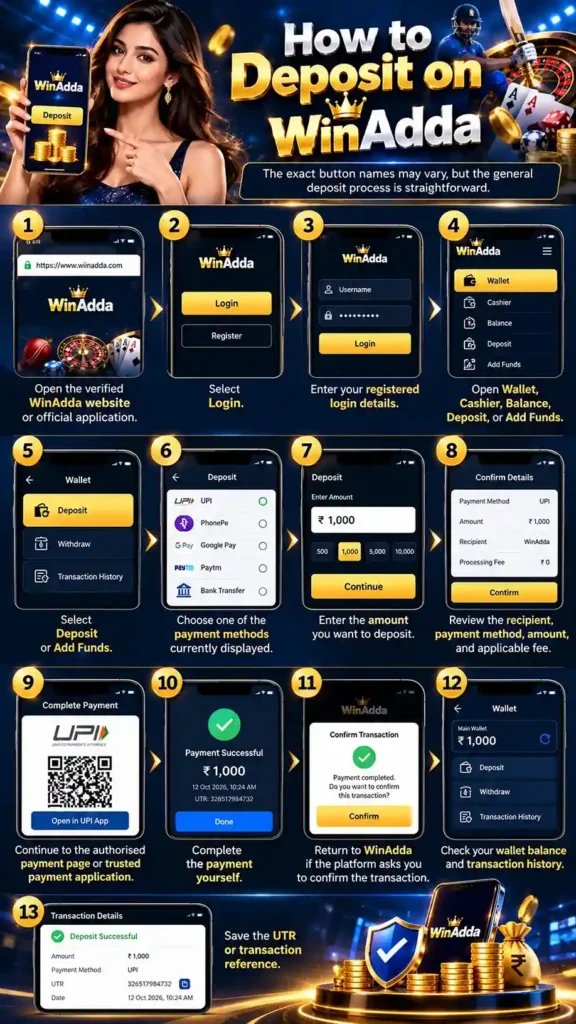
How to Deposit on WinAdda
The exact button names may vary, but the general deposit process is straightforward.
Step-by-step deposit process
- Open the verified WinAdda website or official application.
- Select Login.
- Enter your registered login details.
- Open Wallet, Cashier, Balance, Deposit, or Add Funds.
- Select Deposit or Add Funds.
- Choose one of the payment methods currently displayed.
- Enter the amount you want to deposit.
- Review the recipient, payment method, amount, and applicable fee.
- Continue to the authorised payment page or trusted payment application.
- Complete the payment yourself.
- Return to WinAdda if the platform asks you to confirm the transaction.
- Check your wallet balance and transaction history.
- Save the UTR or transaction reference.
Do not close the payment page immediately after approving a transaction. Wait for the payment result or return to the platform if required so the transaction can be recorded correctly.
Which Payment Methods Are Available on Winadda?
Available payment methods can change according to account, location, payment-provider availability, and platform updates.
The deposit section may display options such as:
- UPI
- Bank transfer
- Digital wallet
- Other payment methods enabled for your account
Only use payment methods that are currently visible inside your verified WinAdda deposit section. A method mentioned in an old blog post, advertisement, screenshot, or message may no longer be supported.
How to choose a payment method
Before selecting a payment option, check:
- Whether the method is currently active
- Minimum deposit limit
- Maximum deposit limit
- Processing time
- Fees
- Whether the payment account must be in your name
- Whether the method qualifies for a promotion
- What happens if the payment fails
- Whether the platform requires a transaction reference
Never send money to a personal bank account, UPI ID, or wallet supplied privately by an unknown agent.
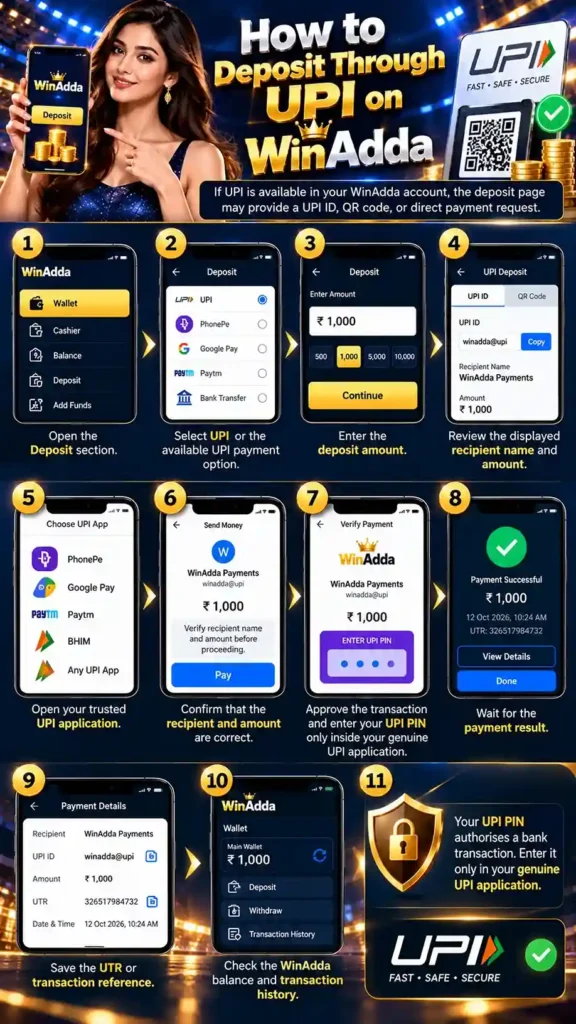
How to Deposit Through UPI
If UPI is available in your WinAdda account, the deposit page may provide a UPI ID, QR code, or direct payment request.
UPI deposit steps
- Open the Deposit section.
- Select UPI or the available UPI payment option.
- Enter the deposit amount.
- Review the displayed recipient name and amount.
- Open your trusted UPI application.
- Confirm that the recipient and amount are correct.
- Approve the transaction only when the details match.
- Enter your UPI PIN only inside your genuine UPI application.
- Wait for the payment result.
- Save the UTR or transaction reference.
- Check the WinAdda balance and transaction history.
Your UPI PIN authorises a bank transaction. It is not required for someone to send money to you and should never be shared with a support agent, payment intermediary, or another person.
Important UPI safety rules
- Never enter your UPI PIN on the WinAdda website.
- Never send your UPI PIN to another person.
- Never approve a collect request that you did not create.
- Check the recipient name before entering your PIN.
- Do not scan a QR code sent by an unknown person.
- Do not approve a payment because someone claims it is necessary to receive a refund.
- Do not make another payment while the first transaction is still pending.
- Use only a payment account permitted by the platform.
- Report an unauthorised transaction to your bank and UPI provider immediately.
A QR code or payment request can authorise money leaving your bank account. It is not automatically a method for receiving money.
How to Deposit Through Bank Transfer
If a bank-transfer option is available, use only the bank details currently shown inside the verified WinAdda payment section.
Never rely on bank details provided by a random agent or forwarded message.
Bank-transfer steps
- Open Deposit or Cashier.
- Select Bank Transfer.
- Review the beneficiary name and bank information.
- Check the account number and IFSC code.
- Add the beneficiary in your banking application only when the details have been verified.
- Enter the required amount.
- Confirm the recipient details.
- Complete the transfer through your bank.
- Save the UTR, reference number, date, time, and amount.
- Return to the WinAdda deposit page if required.
- Submit the transaction reference if requested.
- Check the wallet and transaction history.
Never transfer money to a personal bank account unless the platform’s verified payment instructions clearly identify it as an authorised payment account.
If beneficiary details suddenly change, stop the transaction and verify them through an official support channel.
How to Deposit Through a Digital Wallet
If a digital wallet such as Paytm or another supported provider appears inside the verified WinAdda cashier, follow the instructions shown on the screen.
Check these details before confirming
- Recipient name
- Deposit amount
- Payment request
- Source of the payment request
- Applicable payment fee
- Transaction reference
Never share your wallet password, OTP, or PIN.
Do not send money to a wallet number supplied privately by an unknown agent. Payment instructions should come from the authenticated account area or an independently verified official support process.
What Happens After a Successful Deposit?
After a successful payment, the amount may appear in the available balance or transaction history.
Processing can depend on the payment provider and platform processing system, so a successful payment in your bank or UPI application does not necessarily mean that the WinAdda balance will update immediately.
Check these details after payment
- Wallet balance
- Deposit history
- Transaction status
- Payment reference
- UTR
- Applicable promotion or bonus conditions
- Whether the amount is available or pending
Keep the transaction reference until the deposit has been fully confirmed.
Do not immediately make another deposit simply because the first transaction has not appeared. Repeating the payment may create duplicate transactions and make resolution more difficult.
WinAdda Deposit Statuses Explained
| Status | What it generally means | Recommended action |
|---|---|---|
| Successful | The payment or account credit is marked complete. | Check the wallet and save the transaction reference. |
| Pending | Processing or payment matching has not finished. | Wait for the stated processing period and avoid another payment. |
| Failed | The payment did not complete. | Check whether money was deducted before trying again. |
| Reversed | The payment was cancelled or returned. | Check the original bank or wallet account. |
| Under review | Additional payment or account checks may be taking place. | Follow instructions from the verified support channel. |
The exact meaning of each status depends on the current platform terms and payment provider. If the status does not clearly explain what happens next, contact official support.
What to Do If Money Was Deducted but the Winadda Balance Did Not Update
If your bank or UPI application shows a successful debit but the WinAdda balance has not updated, do not immediately make another deposit.
Steps to take
- Open your bank or UPI application.
- Confirm the payment status.
- Check whether the transaction is successful, pending, failed, or reversed.
- Record the amount, date, time, recipient, and payment method.
- Save the UTR or transaction reference.
- Check WinAdda transaction history.
- Refresh the account once after a reasonable interval.
- Contact official support if the balance remains unchanged.
- Contact your bank or payment provider if the transaction remains unresolved.
- Keep any complaint or ticket number.
If support asks for a screenshot, redact sensitive information before sending it.
Information you should hide from screenshots
Never expose:
- Password
- OTP
- UPI PIN
- Card PIN
- Full card number
- Banking password
- Unnecessary personal information
The transaction reference or UTR should remain visible when support needs it to trace a payment.
What to Do If a Deposit Fails
A failed deposit can happen for several reasons, including:
- Incorrect payment details
- Insufficient bank or wallet balance
- Payment-provider downtime
- Expired payment request
- Network interruption
- Daily transaction limit
- Account verification issue
- Maintenance
- Unsupported payment method
- Payment page closing before completion
- Temporary platform issue
Steps after a failed deposit
- Read the exact error message.
- Check your bank or UPI application.
- Confirm whether money was deducted.
- Check WinAdda transaction history.
- Save the UTR or payment reference.
- Do not immediately submit the same payment again.
- Contact official support if money was deducted or the status is unclear.
- Provide the payment amount, date, time, method, and reference number when requested.
If no money was deducted
If the transaction failed and no money left your bank or wallet:
- Wait briefly before retrying.
- Check whether the payment method is still available.
- Start again from the current verified deposit page.
- Recheck the recipient and amount.
- Complete the payment only after all details match.
If money was deducted
If your bank shows a debit but WinAdda does not show the deposit:
- Do not repeat the payment.
- Check whether the transaction is pending or reversed.
- Save the UTR.
- Contact verified support.
- Contact your bank or UPI provider if necessary.
- Keep the debit confirmation and complaint number.
What to Do If a Deposit Is Pending
A pending transaction may require additional time to be confirmed by the bank, UPI provider, wallet, or platform.
While a deposit is pending:
- Do not make another payment for the same amount.
- Do not cancel a bank transfer unless your bank instructs you to do so.
- Save the transaction reference.
- Check the stated processing period.
- Contact support if the transaction exceeds that period.
- Monitor your bank or wallet account for reversal or settlement.
A pending status does not guarantee that the amount will eventually be credited. Wait for the final transaction status before treating the funds as available.
What Is the Minimum Deposit Amount on Winadda?
There may not be one universal minimum deposit amount because limits can vary by:
- Payment method
- Account status
- Location
- Current platform terms
- Promotional requirements
- Payment-provider limits
The correct minimum is the amount displayed when you select the payment method inside your authenticated WinAdda account.
Do not rely on a fixed amount published in an old article or third-party source.
A UPI minimum, for example, may differ from a bank-transfer minimum or another available payment method.
What Is the Maximum Deposit Amount on Winadda?
The maximum deposit amount can also vary.
Possible factors include:
- Daily account limits
- Monthly account limits
- Payment method
- Bank restrictions
- UPI restrictions
- Verification status
- Responsible-play settings
- Current platform policy
- Applicable local requirements
Check the maximum amount displayed before confirming your payment.
If the platform displays a lower limit than expected, do not split a large payment into multiple transactions simply to bypass the limit. Contact official support to determine whether the restriction is temporary, account-specific, or related to verification.
WinAdda Deposits and Promotional Offers
A deposit promotion or welcome bonus does not necessarily mean that the full advertised amount becomes immediately withdrawable.
Before accepting any promotion, read the complete terms.
What to check before accepting a deposit promotion
Check:
- Eligibility
- Minimum qualifying deposit
- Maximum bonus amount
- Expiry date
- Eligible payment method
- Eligible sports or games
- Activity, wagering, or turnover conditions
- Withdrawal requirements
- Maximum withdrawal amount, where applicable
- One-account restrictions
- One-device restrictions
- Payment-method restrictions
- What happens if you withdraw before completing the conditions
- Whether the offer is available in your location
Do not deposit money solely because a promotional banner creates urgency.
A promotion should only be considered after you understand its conditions and can afford the deposit without affecting essential expenses.
How to Claim the Winadda Welcome Bonus
A welcome bonus may be available only when the current WinAdda promotion explicitly provides one. Not every new account necessarily qualifies.
General welcome-bonus process
- Read the welcome-bonus terms before depositing.
- Confirm that the offer is available for your account and location.
- Check the qualifying payment method.
- Check the minimum deposit requirement.
- Review the expiry date.
- Check whether a bonus code is required.
- Make the qualifying deposit through the verified account area.
- Check whether the bonus is credited automatically.
- Review your bonus balance and transaction history.
- Contact official support if the promotion is not credited after the stated processing period.
Welcome-bonus conditions to check
Before accepting the offer, confirm:
- Minimum qualifying deposit
- Maximum bonus amount
- Whether the offer is for new users only
- Whether identity verification is required
- Whether one offer is allowed per person
- Device restrictions
- Payment-method restrictions
- Eligible games or sports
- Activity or wagering requirements
- Turnover requirements
- Expiry date
- Maximum withdrawal amount, if applicable
- Whether early withdrawal cancels the offer
- Whether the deposited amount itself can be withdrawn
- Whether the promotion is available in your location
A welcome bonus is not automatically the same as withdrawable cash. The full promotion terms determine how it can be used and what conditions apply.
What to do if the welcome bonus is not credited
Check:
- Whether your deposit met the minimum requirement
- Whether the payment method qualified
- Whether the offer expired
- Whether your account had already received a promotion
- Whether a bonus code was required
- Whether verification is incomplete
- Whether multiple registrations exist
- Whether the bonus is still within the published processing time
When contacting support, provide the relevant transaction reference if requested, but never send your password, OTP, UPI PIN, or card PIN.
What Happens If Money Is Sent to the Wrong Account?
If you accidentally send money to the wrong UPI ID, bank account, or payment recipient, act as quickly as possible.
Immediate steps
- Save the payment receipt.
- Record the UTR or transaction reference.
- Note the amount, date, time, recipient, and payment method.
- Raise a dispute through your UPI or banking application.
- Contact your bank through its official customer-support or fraud channel.
- Contact verified WinAdda support if you intended to make a WinAdda deposit.
- Keep all complaint and ticket numbers.
NPCI advises users to raise complaints about unidentified or unauthorised UPI transactions with their respective bank, and its UPI complaint process can be used for UPI-related disputes.
Recovery is not guaranteed, particularly when a user personally authorised a transfer to the wrong recipient. The bank or payment provider must investigate whether the transaction can be reversed or recovered.
If you believe the payment was fraudulent
If someone impersonated support, deceived you, or supplied fake payment details:
- Contact your bank immediately.
- Report the matter through the appropriate official cybercrime channel.
- Preserve messages, phone numbers, URLs, screenshots, and payment records.
- Do not send another payment to “unlock” a refund.
- Do not share your OTP or UPI PIN with anyone claiming to investigate the transaction.
For suspected cyber fraud in India, users can report through the National Cyber Crime Reporting Portal.
Common WinAdda Deposit Mistakes to Avoid
Sending money to an unofficial account
Do not send money to a personal UPI ID, bank account, or wallet supplied by an unknown agent.
Verify payment details inside the authenticated platform.
Using old bank or UPI details
Payment information can change. Always use the details displayed on the current verified deposit page.
Entering a UPI PIN on a website
Your UPI PIN should only be entered inside your trusted UPI application when you understand and approve the transaction.
Repeating a pending payment
A pending payment may later complete. Making another payment can create duplicate deductions.
Using another person’s payment account
Using someone else’s bank account or wallet can create verification, compliance, refund, or transaction-resolution issues.
Sharing sensitive payment information
Never share:
- OTP
- UPI PIN
- Card PIN
- Password
- Banking password
- Full card details
If a screenshot is required for support, redact sensitive information first.
Accepting a bonus without reading the terms
Promotional conditions can affect when or whether funds can be withdrawn. Read the complete terms before accepting an offer.
Trusting claims of guaranteed instant deposits
Processing time can depend on the payment provider, network, account checks, and platform status. Do not rely on unsupported promises of guaranteed instant credit.
Depositing to recover losses
Do not increase your deposits simply because you experienced a previous loss. A deposit should never be treated as a guaranteed way to recover money.
How to Stay Safe While Making a Deposit
Good account and payment security practices can reduce avoidable risks.
Basic account-security practices
- Type the verified website address yourself when possible.
- Use a private device and secure connection.
- Keep your operating system updated.
- Keep your browser updated.
- Use a strong and unique password.
- Enable available account-security features.
- Never disclose OTPs or PINs.
- Check the payment recipient before approval.
- Save transaction references.
- Monitor your bank and wallet statements.
- Contact your bank quickly if a payment is unauthorised.
- Use the platform only where permitted.
- Meet the applicable legal age requirement.
If someone claiming to be support asks for your password, OTP, UPI PIN, card PIN, remote-access permission, or a separate personal payment, stop the conversation and verify the contact independently.
Responsible Deposit Habits
Depositing money into a real-money gaming platform should be treated as a discretionary expense rather than a guaranteed source of income.
Before adding money, decide how much you can afford to lose without affecting essential expenses such as:
- Rent
- Food
- Education
- Medical expenses
- Debt payments
- Household expenses
- Other financial obligations
Avoid depositing when
- You need to borrow money to deposit.
- You are using credit to chase losses.
- You are increasing your deposit after losing.
- You are treating gaming as a source of income.
- You feel pressured by a promotion.
- You are hiding deposits from people responsible for your finances.
- You are angry, stressed, or intoxicated.
Set a personal spending limit before participating.
If the platform provides tools such as deposit limits, time reminders, cooling-off periods, or self-exclusion, understand how they work and use them when appropriate.
Online gaming safeguards can include age checks, spending controls, warnings, and user-control tools.
What to Do When Contacting Winadda Support About a Deposit
If you need help with a deposit, provide the information necessary to identify the transaction without exposing sensitive credentials.
Recommended support message
Hello, I attempted a deposit on [date] at approximately [time]. The amount was [amount], and I used [payment method]. The transaction reference or UTR is [reference]. The current status is [pending/failed/debited but not credited]. Please check the transaction and confirm the next step.
Information you should not send
Never include:
- Password
- OTP
- UPI PIN
- Card PIN
- Banking password
- Full card number
- Unnecessary identity information
If a payment screenshot is requested, redact sensitive information before sending it.
FAQs About Win Adda Deposits
What is the minimum deposit on Winadda?
The minimum deposit may vary by payment method, account, location, promotional conditions, and current platform terms. Check the minimum amount shown on the Add Money page after you log in, rather than relying on an old article or message. usually winadda minimum deposit amount is ₹100.
What is the maximum deposit on Winadda?
The maximum deposit may vary based on your payment method, account limits, verification status, responsible-play settings, bank or UPI restrictions, and current platform policy. Check the limit shown on the Add Money page before you confirm the transaction. maximum deposit you can is ₹50,000. and if your winadda VIP member you must have higher limit.
Which payment methods are available on Winadda?
Available options may include UPI, bank transfer, digital wallets, or other methods enabled for your account. The exact options can change, so use only the payment methods currently shown on the Add Money page in your logged-in account.
How do I deposit money on Winadda?
Log in on the official Winadda website or app, open the Wallet or Add Money section, select an available payment method, and enter the amount. Check the recipient name, payment details, limits and fees, complete the payment through your trusted payment app, and save the UTR or transaction reference.
How long does a Winadda deposit take?
Processing time can vary depending on the bank, UPI provider, wallet, payment processor, account checks, and platform processing. Check the transaction status in your deposit history, and do not rely on a fixed time unless it is stated in the current terms.
My money was deducted but my balance did not update. What should I do?
Do not make another deposit immediately. Check your bank or UPI transaction status, save the UTR or transaction reference, check your Winadda deposit history, and contact support at support@wiinadda.com or +91 94141 72222 if the balance remains unchanged.
Why is my Winadda deposit pending?
A deposit may show as Pending because of payment-network delays, verification, maintenance, incorrect details, payment-provider issues, or platform processing. Do not submit another deposit while it is pending, and contact support if it stays pending beyond the stated processing period.
What should I do if my Winadda deposit failed?
First check whether money was deducted. If it was not, check the error message and the payment method before trying again. If money was deducted, do not repeat the payment; save the transaction reference and contact Winadda support and, if needed, your bank or payment provider.
Can support ask for my UPI PIN, or can I pay through a link sent on WhatsApp?
No. Never share your UPI PIN, OTP, password, or card PIN with support or anyone else. Avoid unsolicited payment links, including links sent on WhatsApp. Open the official Winadda website or app directly and use only the payment details shown inside your logged-in account.
Is a welcome bonus the same as withdrawable cash?
Not necessarily. A welcome bonus applies only if the current promotion says you are eligible, and bonus credits may have activity, wagering, turnover, expiry, or withdrawal conditions. Read the full promotion terms before you deposit or accept the bonus.