
How to Verify the Official Winadda Website
When users search for Winadda, they may see several websites, advertisements, social-media pages, messaging accounts, and APK download links using similar names. A familiar logo or high search ranking does not prove that a website is official. Search results can include multiple sites using similar brand names, so users should verify the exact domain before entering login, identity, or payment information.
This guide explains how to check a Winadda website or link, identify warning signs, verify an Android APK source, and respond if you have already entered information on a suspicious page.
Important: This is a website-safety guide, not a confirmation that any particular WinAdda domain is official. The official domain, support details, app availability, and platform terms should be confirmed directly through the brand’s verified channels. Never share your password, OTP, UPI PIN, card PIN, or banking password with anyone.
Table of Contents
Why website verification matters
A fake website may copy:
- The WinAdda logo.
- Colours and page design.
- Login forms.
- Registration buttons.
- Support-page wording.
- Promotional banners.
- APK download buttons.
- WhatsApp or Telegram contact details.
The purpose of a fake page may be to collect usernames, passwords, mobile numbers, OTPs, identity documents, payment information, or direct deposits.
Phishing is a form of deception in which an attacker pretends to represent a trusted service to obtain information or money. Security guidance recommends checking the web address, avoiding unexpected links, and reporting suspected phishing rather than interacting with it.
Website verification is particularly important before:
- Creating a WinAdda ID.
- Logging in.
- Downloading an APK.
- Uploading identity documents.
- Adding money.
- Requesting a withdrawal.
- Contacting support.
- Sharing a transaction reference.

Step 1: Check the exact domain
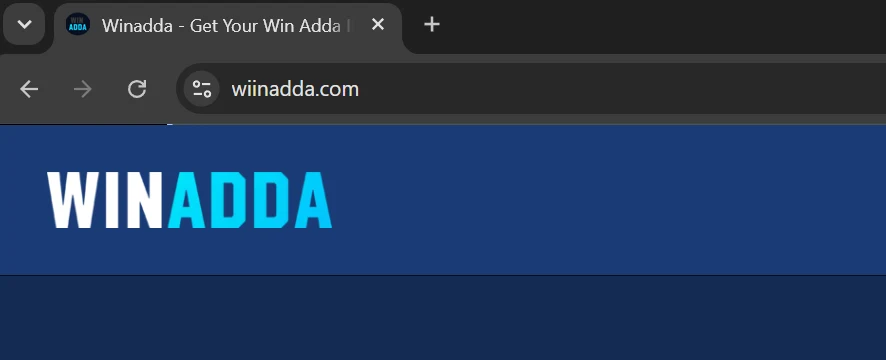
The domain is the main website address shown in your browser’s address bar. Read it carefully rather than relying only on the page design.
Check for spelling changes
Look for:
- Extra letters.
- Missing letters.
- Replaced characters.
- Hyphens inserted into the brand name.
- Unusual words added before or after the brand.
- Different domain endings.
- Numbers replacing letters.
- Subdomains that create confusion.
For example, a fake website may use a spelling that looks similar at a quick glance. On a mobile screen, small differences can be difficult to notice, so zoom in or copy the domain into a safe note for review.
Check the domain ending
A .com, .in, .net, or another extension does not automatically prove that a website is official. Scammers can register many different domain endings.
The extension is only one part of the check. Compare the complete domain with the address published through a verified WinAdda source.
Watch for misleading subdomains
A page may display a trusted name in a longer address while the actual registered domain belongs to another organisation. Read from right to left when checking the main domain.
For instance, a format such as:
winadda.example.com
is controlled by example.com, not necessarily by WinAdda. Do not rely on the word “winadda” appearing somewhere in the address.
Avoid shortened links
Short links can hide the final destination. Be careful with links from:
- WhatsApp.
- Telegram.
- SMS.
- Social-media comments.
- Online advertisements.
- Unknown blogs.
- Direct messages.
- Pop-up windows.
Instead of opening an unexpected link, type the verified website address manually or access it through a trusted official source.
Step 2: Do not trust the first search result
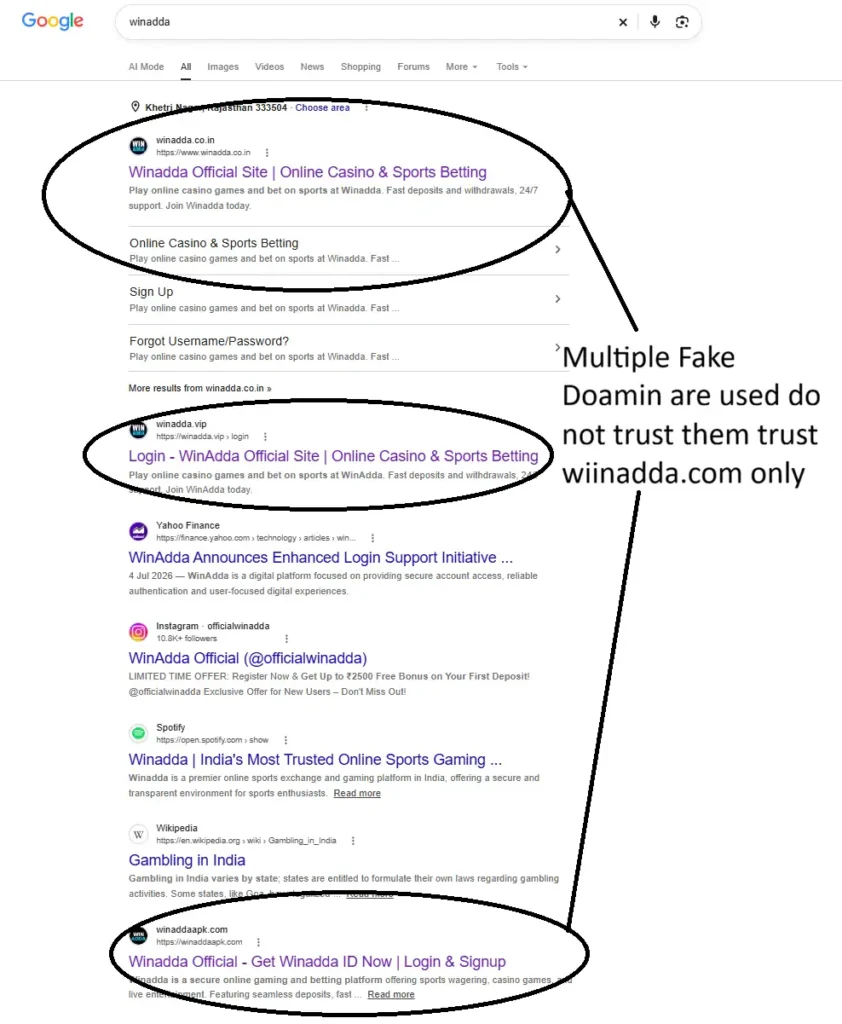
A high position in search results is not proof of authenticity. Paid advertisements, copied content, third-party pages, and similarly named domains can all appear in search results.
Before using a search result:
- Read the complete domain.
- Check whether the page links to clear terms, privacy, support, and responsible-play information.
- Compare its contact details with an independently verified source.
- Avoid clicking urgent promotional ads.
- Do not enter personal details just because the page appears first.
Search engines can help locate information, but they should not be the only method used to verify a gaming or payment website.
Step 3: Confirm the domain independently
Use a source that is separate from the link you are checking.
Possible sources include:
- A verified official social-media account.
- A previously saved official bookmark.
- A trusted official email.
- A platform’s verified support page.
- A QR code or printed communication that you have independently confirmed.
- Official policy pages linked from the verified site.
Do not use the contact information shown on a suspicious website to verify that same website. A fake page may publish its own fake WhatsApp number, email address, or Telegram account.
Step 4: Check the HTTPS connection
A genuine website should normally use HTTPS, and your browser may show a padlock or similar security indicator. HTTPS encrypts the connection between your browser and the website, but it does not prove that the website belongs to WinAdda.
Scammers can also obtain HTTPS certificates for deceptive domains.
What HTTPS tells you
HTTPS generally indicates that:
- The connection is encrypted.
- Data is protected while travelling between your browser and the website.
- The website has a valid certificate for its domain.
What HTTPS does not tell you
HTTPS does not prove that:
- The company is legitimate.
- The website is the official WinAdda domain.
- The payment request is safe.
- The APK is genuine.
- The support agent is authentic.
- The platform is legal or available in your location.
Always inspect the complete domain even when the padlock is displayed.
Step 5: Identify a fake login page
A fake login page may look almost identical to a genuine page, but several warning signs can reveal a problem.
Common warning signs
- A strange or misspelled domain.
- The page opens from an unexpected message.
- The site asks for an OTP before explaining why.
- The page requests a UPI PIN or card PIN.
- The login form contains unusual spelling or grammar errors.
- The page redirects through several unrelated domains.
- The site asks you to install a browser extension.
- The page demands an urgent deposit to unlock an account.
- The support button opens a personal number.
- The page promises guaranteed winnings or special access.
- The page asks for full banking credentials.
- The website has no clear privacy, terms, complaint, or support information.
- The site asks you to disable device security tools.
Check the address before entering details
Before typing your password:
- Tap or click the address bar.
- Read the entire domain.
- Confirm the spelling.
- Check whether the page has unexpectedly redirected.
- Close the tab if anything appears unusual.
Never enter your password on a page reached from an unsolicited message unless you have independently verified the link.
Step 6: Watch for scam language
Fraudulent websites and fake support agents often create urgency or promise unrealistic benefits.
Be cautious of messages such as:
- “Deposit now to activate your account.”
- “Pay a fee to release your withdrawal.”
- “Send your OTP to verify your identity.”
- “Guaranteed winning available today.”
- “Your account will close in ten minutes.”
- “Special ID available only through this agent.”
- “Pay a security amount before withdrawal.”
- “Send your UPI PIN for refund.”
- “Install this private APK to receive a bonus.”
- “Do not contact official support.”
Urgency is designed to stop you from checking the information. Pause, close the message, and verify the request independently.
A legitimate support process should not require your UPI PIN, card PIN, banking password, or one-time verification code.
Step 7: Verify support channels
A WhatsApp number, Telegram handle, phone number, or email address is not automatically official.
How to check a support channel
- Open the verified WinAdda website manually.
- Go to the official Contact, Support, or Help page.
- Compare the listed contact details.
- Confirm that the support link opens the expected account.
- Check whether the support channel is described as text-only, ticket-based, or available during specific hours.
- Save the official support page instead of relying on forwarded contacts.
Do not trust an agent who says:
- They can guarantee a withdrawal.
- They can create a secret account.
- They need your password or OTP.
- They need remote access to your phone.
- You must pay them personally.
- They can bypass verification.
- You must keep the conversation secret.
For a support request, provide only necessary information such as your account ID, issue description, transaction reference, date, and a carefully redacted screenshot.
Step 8: Verify an APK before installation
An APK is an Android installation file. It is not automatically safe simply because its file name contains “WinAdda.”
Search results can include third-party APK listings or unrelated applications using similar names. The package name, publisher, permissions, and source must be checked before installation.
Safer APK checks
Before installing:
- Confirm that the download link appears on the verified WinAdda website.
- Check the publisher or developer information.
- Review the package name if it is displayed.
- Check the file name and version.
- Review the requested permissions.
- Keep Google Play Protect or equivalent security controls active.
- Avoid modified, cracked, or “special bonus” APKs.
- Do not install a file received from an unknown Telegram group or personal contact.
- Do not disable security features simply to complete installation.
- Remove installation permission after use if Android has enabled it for your browser or file manager.
Suspicious permissions
Be cautious if an APK requests unnecessary access to:
- SMS messages.
- Contacts.
- Accessibility controls.
- Device administration.
- Call logs.
- Notifications.
- Files unrelated to the app’s function.
- Screen recording or remote control.
If Play Protect or your device displays a warning, stop and verify the source. Do not assume that the warning is a mistake.
iPhone users
An Android APK cannot be installed on an iPhone. Do not download “iOS APK” files or install unknown configuration profiles, certificates, or enterprise applications.
If the verified WinAdda website supports mobile web access, open it directly in Safari. You may be able to select Share → Add to Home Screen, but this creates a website shortcut rather than installing an Android APK.
Step 9: Check website content and transparency
A genuine platform should provide clear information about its services and user protections. The presence of these pages does not alone prove authenticity, but missing or copied information is a warning sign.
Look for:
- About or company information.
- Terms and conditions.
- Privacy policy.
- Responsible-play information.
- Account verification guidance.
- Payment and withdrawal rules.
- Complaint or grievance process.
- Support contact details.
- Age restrictions.
- Location or availability information.
Read the pages rather than checking only whether the links exist. Look for inconsistent names, copied text, broken links, placeholder emails, and promises that conflict with the platform’s terms.
Avoid websites that make absolute claims such as “100% safe,” “guaranteed profit,” or “no-risk winnings.” A gaming platform should not present money-based activity as a guaranteed source of income.
Step 10: Check payment requests carefully
Before making a deposit:
- Confirm that the payment method appears in the verified account area.
- Check the recipient name and payment details.
- Confirm the amount.
- Read any displayed conditions.
- Keep the payment reference.
- Do not send money to a personal account just because an agent requests it.
- Do not approve a collect request that you did not create.
- Never share your UPI PIN or OTP.
- Do not pay an unofficial “unlock,” “tax,” or “release” fee.
If the payment instructions change suddenly, stop and verify them through the official website. A message that creates urgency or secrecy deserves extra caution.
What if you already entered your details?
Act quickly, but do not panic. The correct response depends on what information you shared.
If you entered your password
- Open the verified website directly, not through the suspicious link.
- Change the password immediately.
- Use a password that you do not use elsewhere.
- Sign out of other sessions if that option is available.
- Change the same password anywhere else you reused it.
- Check account activity and payment history.
- Contact official support.
If you shared an OTP
Contact official support immediately and check whether the account, mobile number, email, or payment details have changed. An OTP may allow someone to complete a login, reset, or transaction, so review your account without delay.
If you shared banking information
Contact your bank or payment provider through its official fraud channel. Ask whether the account, card, UPI, or payment method needs to be blocked or monitored.
Do not call a number supplied by the suspicious message. Find your bank’s contact details independently through its official website or banking application.
If you installed a suspicious APK
- Disconnect the device from the internet if you suspect active malicious behaviour.
- Do not enter further passwords or payment information.
- Uninstall the suspicious application if it can be removed safely.
- Review installed apps and permissions.
- Run a trusted security scan.
- Change passwords from a clean, trusted device.
- Contact your bank if payment details may have been exposed.
- Consider professional technical assistance if the app requested accessibility or device-administrator access.
Reporting a suspicious website or scam
In India, the National Cyber Crime Reporting Portal allows people to report cybercrime complaints and suspected identifiers. The portal includes reporting options for website URLs, WhatsApp numbers, Telegram handles, phone numbers, email addresses, SMS headers, and social-media URLs.
If money has been lost or an unauthorised transaction has occurred:
- Contact your bank or payment provider immediately.
- Preserve screenshots, messages, URLs, payment references, and phone numbers.
- Report the incident through the official National Cyber Crime Reporting Portal.
- Use the official cyber-fraud helpline shown by the Government of India.
- Do not delete relevant evidence.
Use only the official portal address. Do not submit sensitive information to a lookalike website reached through an advertisement or unsolicited message.
Website verification checklist
Before using a WinAdda website, ask:
- Is the domain spelling exact?
- Did I open the website independently?
- Does the domain match a verified official source?
- Has the page redirected unexpectedly?
- Is the site asking for an OTP, UPI PIN, or card PIN?
- Is someone creating urgency?
- Are winnings or withdrawals being guaranteed?
- Are support details published clearly?
- Are the terms, privacy, and complaint pages available?
- Is the APK linked from a verified source?
- Does the app request unnecessary permissions?
- Are payment instructions consistent with the official account area?
- Can I explain why I trust this website before entering information?
If you cannot answer these questions confidently, do not log in, deposit, upload documents, or install an application.
FAQs About Official Winadda Website
Is HTTPS enough to prove that a Winadda website is genuine?
No. HTTPS encrypts the connection but does not prove who operates the website. Check the complete domain and compare it with an independently verified official source.
Is the first Google result always the official website?
No. Search ranking is not proof of ownership or authenticity. Read the domain and verify it independently.
Can I trust a Winadda link sent by WhatsApp?
Do not trust it automatically. Open the official website independently and compare the address and support details.
Can support ask for my OTP?
You should never share an OTP with another person. Complete verification yourself on the official website or application.
Can I install any APK with the Winadda name?
No. Verify the source, publisher, package information, permissions, and security warnings before installation. A third-party APK may be unrelated or unsafe.
What should I do if a website asks for a UPI PIN?
Close the page. Never enter a UPI PIN on a website, share it with support, or provide it to a person requesting “verification.”
What if a website promises guaranteed winnings?
Treat this as a major warning sign. Money-based gaming involves financial risk, and no honest website should present winnings as guaranteed.
How can I report a suspicious Winadda link?
Save the URL and related evidence, avoid interacting further, and use the official National Cyber Crime Reporting Portal to report the suspicious website or related identifier.
Final advice
The safest way to access Winadda is to begin with a domain you have independently verified, inspect the complete address before every login, and avoid unsolicited links. Do not assume that a logo, padlock, search ranking, WhatsApp number, or APK file proves authenticity.
If a website asks for your password, OTP, UPI PIN, card PIN, remote access, or an urgent personal payment, stop immediately. Verify the request through an independent official source, protect your accounts, contact your bank when necessary, and report suspected fraud through the appropriate government channel.
18+ only where applicable. Gaming involving money carries financial risk and is not a source of income. Always follow current platform terms and applicable local law.

Pulkit Singh is a content writer at Winadda with over 5 years of experience creating clear, user-focused content for online gaming and sports entertainment platforms. He has researched and reviewed features across different platforms, including account access, sports categories, mobile experiences, payments, bonuses, and support processes.
At Winadda, Pulkit focuses on writing simple, accurate guides that help users understand registration, Win Adda login, dashboard navigation, and responsible-play information. His content is regularly reviewed and updated to keep platform details clear, practical, and easy to understand.