
Winadda Login Not Working? 10 Common Problems and Fixes
Logging in should normally require your registered username, mobile number, or email, followed by your password and any required verification step. If Win Adda login is not working, the cause may be incorrect details, an OTP delay, a browser problem, an account restriction, or an issue with the website.
This guide explains ten common Winadda login problems and the steps users can take to troubleshoot them. Use only the verified Winadda website or official access method, and never share your password, OTP, UPI PIN, card PIN, or banking credentials with anyone.
Important: Login access, support channels, verification requirements, and platform availability may change. Follow the latest information shown on the verified Win adda website. Use any money-based gaming service only where permitted, only if you meet the applicable age requirement, and only with money you can afford to lose.
Table of Contents
Quick checks first
Before trying detailed troubleshooting, complete these basic checks:
- Confirm that you are using the correct official website address.
- Check that your internet connection is working.
- Confirm that Caps Lock is not enabled.
- Check whether you entered your registered mobile number, username, or email correctly.
- Make sure there are no extra spaces before or after your username.
- Enter the current password carefully.
- Check whether the website is loading normally on another browser.
- Do not repeatedly enter incorrect credentials.
- Do not use links received from unknown WhatsApp, Telegram, SMS, or social-media accounts.
- Keep your login details private.
Several websites and applications may use similar brand names. A website displaying the correct logo is not enough to prove that it is official. Verify the exact domain and open support links from the website itself.
Problem 1: Incorrect username or password
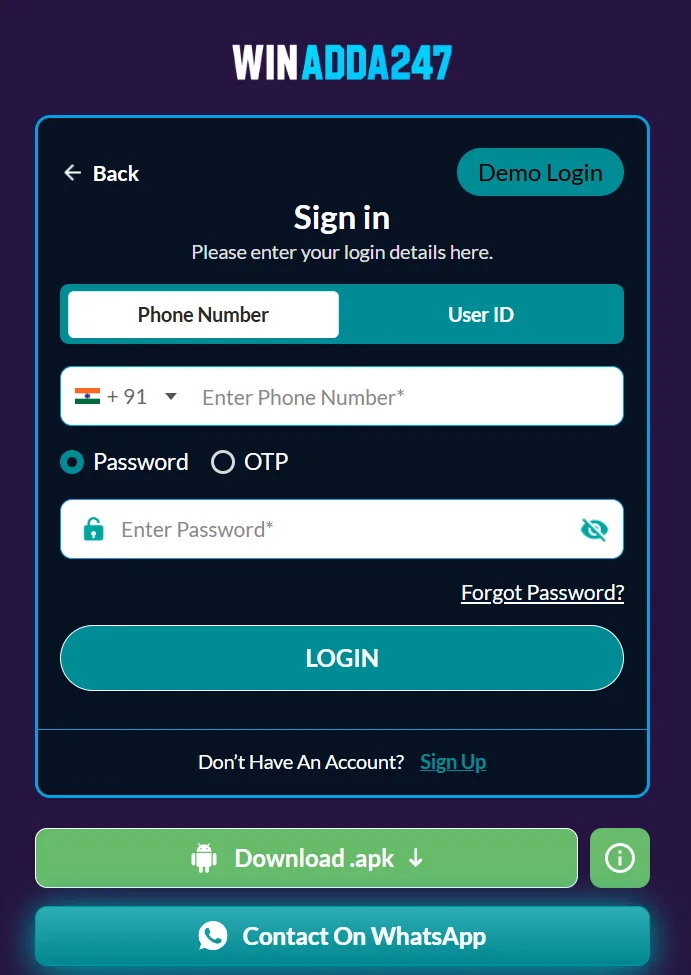
The most common reason for a failed login is an incorrect username, mobile number, email, or password. Users may accidentally use a new number instead of the registered one, enter an old password, or add a space while copying details.
How to fix it
- Return to the official login page.
- Confirm whether the platform requires a username, mobile number, or email.
- Enter the registered detail manually.
- Check uppercase and lowercase letters in your password.
- Make sure Caps Lock is disabled.
- Remove any spaces accidentally added while copying.
- Try the password only once or twice rather than repeatedly.
If you still cannot log in, use the official Forgot Password or Forgot Username option. Do not create a second account simply because you cannot remember the first account details.
What to avoid
Do not ask an unknown person to log in on your behalf. Do not send a screenshot containing your password, OTP, or personal payment information.
Problem 2: Forgotten password
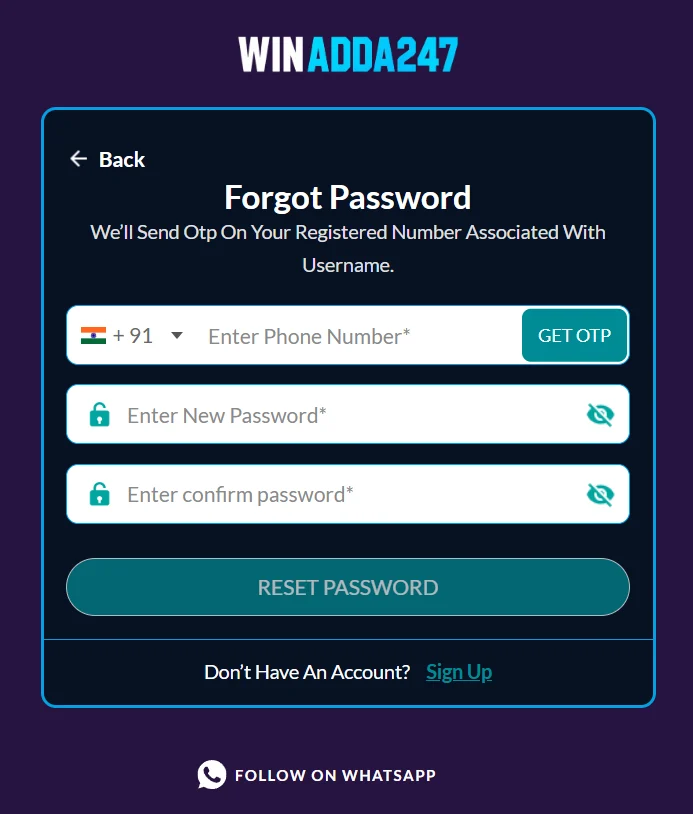
A forgotten password can usually be recovered through the account-recovery option on the official login page. The recovery process may require the registered mobile number, email address, username, or an OTP.
General password-reset steps
- Open the verified WinAdda login page.
- Select Forgot Password, Reset Password, or a similar option.
- Enter the registered account information.
- Request the verification code.
- Enter the OTP only on the official website.
- Create a new, unique password.
- Return to the login page and sign in again.
A strong password should not be reused on email, banking, social-media, or other gaming accounts. Use a combination of letters, numbers, and symbols, but avoid information that another person could easily guess.
If the reset link does not work
- Request a new reset link or OTP.
- Use the most recent code.
- Check whether the link has expired.
- Open the link in the same browser where you started the recovery process.
- Avoid clicking reset links received from unofficial contacts.
- Contact official support if your registered mobile number or email is no longer accessible.
Problem 3: OTP is not received
An OTP may be delayed because of weak mobile coverage, network congestion, an incorrect registered number, a temporary messaging problem, or too many repeated requests.
What to do
- Check that the registered number or email is correct.
- Confirm that your phone has network coverage.
- Check blocked messages, spam folders, and filtered SMS.
- Wait briefly before requesting another code.
- Use Resend OTP only after the displayed waiting period.
- Enter the newest OTP, because an older code may no longer work.
- Restart the phone or switch between a stable Wi-Fi and mobile-data connection.
- Contact the official support team if the problem continues.
Do not share an OTP with a person claiming to be a WinAdda agent. An OTP is used to verify access and should be treated like a password.
Important warning
If someone contacts you and says they need your OTP to activate, unlock, verify, or upgrade your account, do not provide it. End the conversation and contact support using details published on the verified website.
Problem 4: Account is temporarily locked
An account may be temporarily locked after several incorrect login attempts or unusual activity. This security measure can help prevent unauthorised access.
Recommended steps
- Stop trying to log in repeatedly.
- Wait for the period shown in the on-screen message.
- Use the official password-recovery process.
- Change your password if you suspect someone else attempted to access the account.
- Review your email and phone for suspicious alerts.
- Contact official support if the account remains locked after the stated period.
Do not create another account to bypass a lock. Duplicate accounts may create additional verification or compliance problems.
Problem 5: Login page is not loading
Sometimes the login problem is caused by the browser, network, device, or website rather than by your account.
Troubleshooting steps
- Refresh the page once.
- Check whether other websites are loading.
- Switch to a stable connection.
- Try a supported, updated browser.
- Close unnecessary browser tabs.
- Clear temporary cache and cookies if appropriate.
- Restart the browser.
- Try the official website on another trusted device.
- Check whether a maintenance notice is displayed.
- Contact official support if the problem continues.
Do not enter your login details on a replacement website simply because the usual page is unavailable. A temporary loading issue does not justify using an unverified mirror or link.
Problem 6: Browser cache or cookies are causing a problem
Old browser data can sometimes interfere with login sessions, verification windows, or page loading. This may happen after a website update or when a browser stores outdated information.
What you can try
- Open the login page in a private or incognito window.
- Update the browser.
- Clear cache and cookies for the relevant website.
- Close and reopen the browser.
- Check whether JavaScript and cookies are enabled if the login page requires them.
- Disable suspicious or unnecessary browser extensions.
- Try another trusted browser.
Clearing cookies may sign you out of other websites, so save important work first. Never install an unknown browser extension that claims to fix WinAdda login.
Problem 7: Login fails after changing the password
After a password reset, users sometimes continue entering the old password. Some may also use a reset link twice and create confusion about which password is active.
Fixes
- Use the newest password you created.
- Check for extra spaces.
- Type the password manually instead of using an old saved password.
- Delete the old saved password from the browser’s password manager if necessary.
- Wait briefly if the platform says the change is still processing.
- Use the official recovery option again if the new password does not work.
If you use a password manager, confirm that it has saved the updated password rather than the previous one.
Problem 8: Account verification is incomplete
Some accounts may require additional verification before full access to account features. The platform may ask for personal details, age confirmation, identity information, or payment-account verification, depending on its current processes and applicable requirements.
What to check
- Whether your registered name is accurate.
- Whether the mobile number or email is verified.
- Whether the requested information has been submitted through the official website.
- Whether a document image is readable and current.
- Whether the platform has shown a rejection reason.
- Whether the account is waiting for manual review.
Submit sensitive documents only through the verified account area or an official support process. Do not send identity documents, bank information, passwords, or OTPs to random WhatsApp or Telegram accounts.
If verification is rejected
Read the exact reason shown by the platform. Common causes can include mismatched details, poor image quality, expired documents, incomplete information, or unsupported document types.
Do not repeatedly upload random documents. Ask official support which information is required and how it should be submitted.
Problem 9: Login is blocked by location, device, or security checks
A login may be restricted because of a security review, unusual device activity, location restrictions, account rules, or a change in platform availability.
Recommended action
- Read the complete message shown on the login screen.
- Do not try to bypass a restriction using unknown VPNs, proxy services, or another person’s account.
- Check whether your device date and time are correct.
- Disable suspicious browser extensions.
- Log out of unfamiliar sessions if you can access account settings.
- Contact official support and ask for the reason and next steps.
- Review the latest terms and applicable local requirements.
Do not assume that a restriction is a technical error. It may involve identity, account security, payment review, eligibility, or legal requirements.
Problem 10: The app or APK will not open
If you access WinAdda through an Android APK, the installation or app itself may cause the login problem. An APK is an Android installation file; it is not the same thing as a WinAdda ID or account.
Before troubleshooting the app
- Confirm that the APK came from a source verified through the official WinAdda website.
- Check the publisher and package information where available.
- Keep Google Play Protect or your device security controls enabled.
- Avoid modified APK files from third-party websites or messaging groups.
- Do not install an app that requests unnecessary access to contacts, messages, accessibility controls, or device administration.
- Check that your device has enough storage.
- Update Android if an update is available.
If the app does not work, try the official website in a trusted browser instead. iPhone users should not attempt to install Android APK files. If the verified website supports it, an iPhone user may use Safari and add the website to the Home Screen.
If a security tool warns that an APK is unsafe, stop installation and verify the source. Never enter your password, OTP, UPI PIN, or card information into an unverified application.
What to do when none of these fixes work
If you have completed the checks above and still cannot log in, contact WinAdda through the support details displayed on the verified website.
Include:
- Your registered username or account ID.
- The date and approximate time of the problem.
- The exact error message.
- Whether you are using a browser or application.
- Your device and browser type.
- Whether password recovery or OTP delivery also failed.
- A transaction reference, if the problem is connected to a payment.
- A screenshot with passwords, OTPs, card numbers, and sensitive documents hidden.
Example support message
Hello, I cannot log in to my account. The problem started on [date and approximate time]. I am using [device and browser]. The exact message displayed is “[error message].” I have checked my connection and tried the password-recovery option. Please explain the next step. My registered account ID is [ID].
Never include your password, OTP, UPI PIN, card PIN, bank password, or complete card details in a support message.
How to protect your WinAdda account
Login troubleshooting is also an opportunity to improve account security.
Use a unique password
Do not reuse your WinAdda password anywhere else. Change it immediately if you believe it has been exposed.
Protect your OTP
Treat every OTP as private. Official support should not need you to disclose it.
Check account activity
If the dashboard includes login history or active sessions, review it periodically. Sign out of devices you no longer use.
Avoid shared devices
Do not save passwords on a public or shared device. Always log out after using another person’s phone or computer.
Watch for fake support agents
Be cautious of anyone promising:
- Guaranteed winnings.
- Faster withdrawals.
- Special account activation.
- A secret login link.
- An account upgrade after payment.
- Recovery of an account in exchange for an OTP.
Use only support information published on the verified website.
Winadda Login FAQ
Why is my WinAdda password not working?
The password may be incorrect, outdated, mistyped, or entered with an extra space. Check the registered login detail and use the official password-reset option if necessary.
Why has my OTP not arrived?
Check your registered number, network signal, spam or blocked messages, and the waiting period shown on the page. Request a new code only after waiting briefly.
Can I create a new account if I cannot access my old one?
Creating another account may violate platform rules or create verification problems. Recover the original account through the official support or password-reset process.
Can support reset my password for me?
Support may guide you through the official recovery process, but you should complete the reset yourself. Never share your current password or OTP.
What should I do if someone else accessed my account?
Change your password, sign out of other sessions, review account and payment activity, and contact official support immediately. If an unauthorised payment occurred, contact your bank or payment provider as well.
Can I log in through a link sent on WhatsApp?
Do not trust unsolicited links. Open the verified website directly or use a support link published on that website.
Why does login work on one device but not another?
The problem may relate to browser settings, cached data, software compatibility, device time, network restrictions, or security checks. Try an updated trusted browser and contact support if the difference continues.
Is login access available everywhere in India?
Availability and legal requirements may vary by location and may change. Check current local rules and the platform’s latest terms before using the service.

Pulkit Singh is a content writer at Winadda with over 5 years of experience creating clear, user-focused content for online gaming and sports entertainment platforms. He has researched and reviewed features across different platforms, including account access, sports categories, mobile experiences, payments, bonuses, and support processes.
At Winadda, Pulkit focuses on writing simple, accurate guides that help users understand registration, Win Adda login, dashboard navigation, and responsible-play information. His content is regularly reviewed and updated to keep platform details clear, practical, and easy to understand.